



In our digitally connected world, we expect our devices to talk to each other seamlessly, and your vehicle should be no exception. For Toyota owners in Durham, the Toyota Remote Connect service transforms your smartphone into a powerful command center for your car, bridging the gap between your home and your driveway. Imagine waking up on a freezing January morning in Chapel Hill and starting your car from your warm kitchen to defrost the windshield before you even put on your coat. Or perhaps you are sitting in a meeting at RTP and panic, suddenly wondering if you locked your doors. With Remote Connect, these conveniences and anxieties are managed at your fingertips. This guide explains exactly what this technology can do, the specific steps to set it up without frustration, and how to maximize its features to enhance your ownership experience.
Comprehensive Suite of Connected Features and Real-World Utility
Toyota Remote Connect is a sophisticated suite of services accessible via the Toyota app that utilizes a Data Communication Module (DCM) built directly into the vehicle’s telematics system. The most popular feature is the Remote Engine Start. Unlike a traditional key fob remote start that has a limited range of a few hundred feet, the app-based system uses cellular signals, meaning you can start your engine and your climate control system from virtually anywhere whether you are checking out at the grocery store or just landing at RDU airport.
The system runs the engine for precisely 10 minutes before automatically shutting off to conserve fuel and ensure safety, ensuring your cabin is comfortable when you finally arrive. Beyond basic ignition controls, the Remote Door Lock and Unlock feature serves as a digital lifesaver for busy professionals in the Triangle; no more trekking back to a distant parking lot to verify if you secured your vehicle. You can simply tap the app to lock it instantly from your office desk.
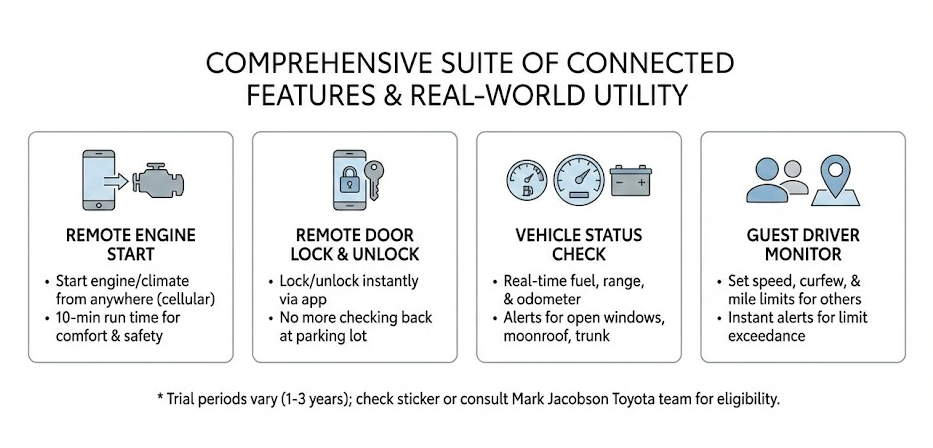
Furthermore, the Vehicle Status check provides a comprehensive real-time health report, allowing you to view your fuel level, remaining driving range, and odometer reading. Crucially, it sends push notifications if windows, the moonroof, or the trunk were left open after you walked away. For families and those who utilize valet services in downtown Durham, the Guest Driver Monitor is a standout safety tool. This allows you to set strict digital boundaries for other drivers, such as teenagers or service attendants. You can configure precise limits on maximum speed, curfew times, and total miles driven.
If the vehicle exceeds these pre-set parameters for example, if a valet takes the car outside a designated geofenced radius or a teen exceeds 75 mph the primary owner receives an instant alert. Most new Toyotas come with a trial period for Remote Connect, typically ranging from one year to three years depending on whether the vehicle is equipped with Audio Plus or Premium Audio packages. It is vital to check your window sticker or consult with our specialized technology team at Mark Jacobson Toyota to confirm your specific trial duration and eligibility, as this ensures you never lose access to these critical conveniences during your first years of ownership.
Specialized Remote Services for Electric and Hybrid Vehicles
For owners of electrified models like the RAV4 Prime, Prius Prime, or the all-electric bZ4X, Remote Connect offers an even more robust set of tools specifically designed for energy management. These features allow you to monitor your current battery percentage and estimated EV-only driving range in real-time, which is essential for planning commutes across the Triangle. You can remotely start or stop a charging session, which is particularly useful if you want to take advantage of off-peak electricity rates provided by local utility companies.
Furthermore, the app allows you to set a detailed charging schedule so the vehicle is always topped off right before your morning departure. Perhaps the most beneficial feature for EV owners is the Remote Climate Prep. Unlike standard gas vehicles, you can activate the heater or air conditioning while the car is still plugged into your home charger. This uses grid power instead of battery power to reach the desired temperature, effectively preserving your maximum driving range for the road. This specialized integration ensures that your transition to electric driving is as efficient and high-tech as possible, providing a level of control that traditional vehicles simply cannot match.
Master the Activation Handshake and Seamless App Integration
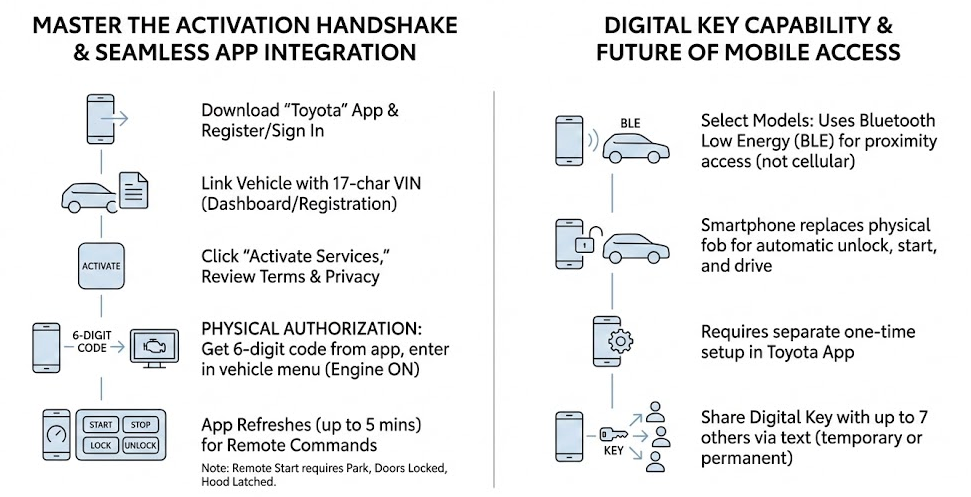
Activating Remote Connect is a straightforward process, but it requires a specific, secure sequence of steps to prevent unauthorized access to your vehicle and ensure your data remains private. First, you must download the official “Toyota” app from either the Apple App Store or Google Play Store. Once installed, open the app and click “Register” to create a new account, or sign in if you already have an existing Toyota profile. To link your vehicle, you will need your 17-character Vehicle Identification Number (VIN), which is conveniently located on your vehicle registration card or the driver’s side dashboard near the bottom of the windshield. After the vehicle is successfully added to your virtual “Garage” within the app, a tile will appear labeled “Activate Services” or “Connected Services.”
Clicking this initiates the enrollment process where you will review and accept the terms of service and privacy data disclosures. The most critical step, and the one that frequently confuses new users, is the physical authorization “handshake” between the phone and the car. After completing the enrollment on your phone, the app will generate a unique 6-digit authorization code. You must then take this code into your vehicle, start the engine to ensure the multimedia system is fully powered, and navigate to the “Apps” icon on your vehicle’s touchscreen bezel. Within this menu, find the “Remote Connect” or “Authorization” section. Enter the 6-digit code from your smartphone into the car’s screen and press submit.
This vital physical step verifies that only someone with actual possession of the vehicle can link it to a mobile device, acting as a robust defense against remote digital theft. Once the code is authorized, the app dashboard will refresh though this may take up to five minutes to display the remote command buttons for Start, Stop, Lock, and Unlock. It is important to note that for a Remote Start command to execute successfully, the vehicle must be in “Park,” all doors must be fully closed and locked, and the hood must be latched. By following this precise sequence, you ensure that your vehicle’s telematics system is properly synced with Toyota’s secure cloud servers for reliable long-term performance.
Digital Key Capability and the Future of Mobile Access
On select newer models such as the latest generation Toyota Crown, Prius, and bZ4X, the Remote Connect suite is expanded by the “Digital Key” capability, which represents the next evolution in vehicle access. It is important to distinguish this from the standard cellular-based Remote Connect features; while Remote Connect works over long distances via 4G LTE, the Digital Key utilizes Bluetooth Low Energy (BLE) to communicate with your car when you are in close proximity.
This technology allows your smartphone to function as a literal replacement for your physical key fob. As you approach the vehicle with your phone in your pocket or bag, the doors can automatically unlock, and you can start the engine and drive away without ever touching a piece of hardware. This feature is managed through the same Toyota app but requires a separate one-time setup to “pair” the phone’s secure element with the car’s computer.
One of the most innovative aspects of this technology is the ability to “share” your digital key with up to seven family members or friends. You can send a digital invite via text message, granting them temporary or permanent access to drive your vehicle. This is perfect for scenarios where a family member needs to borrow the car while you are traveling, or if you accidentally leave your keys inside the house.
Safety Logic, Signal Constraints, and Navigation Shortcuts
Toyota prioritizes the safety of both the driver and the vehicle’s surroundings above all else, which results in certain operational logic that new owners should understand to avoid confusion. The most frequent inquiry we receive at Mark Jacobson Toyota is regarding why the engine shuts off as soon as a door is opened after a remote start. This is not a technical glitch; it is an intentional anti-theft safeguard. By shutting down the engine the moment the door is unlocked and opened, the system ensures that an unauthorized individual cannot jump into your running vehicle and drive away while you are still walking toward it. To continue your journey, you must simply enter the car, press the brake pedal, and hit the “Start” button to officially restart the vehicle with the key or phone present.
Additionally, users should be aware of the environmental factors that affect performance. Because the system relies on a 4G LTE cellular network, typically provided by AT&T, signal strength is paramount. While coverage across Durham, Chapel Hill, and the Research Triangle is exceptionally strong, physical barriers like deep underground concrete parking garages such as those found at major hospitals or university campuses can block the signal to the vehicle’s DCM. If the car cannot “hear” the signal from the cloud, the command will fail. To mitigate the frustration of losing your car in these large parking structures or at expansive lots like those at Southpoint Mall or RDU Airport, the app includes a “Vehicle Finder” feature. This tool uses the car’s onboard GPS to drop a precise pin on a Google-based map within your app. It even provides walking directions back to your car, which is an invaluable asset when you’ve forgotten your parking row or section after a long day of travel or shopping.
Wearable Integration and the Convenience of Smartwatches
For the tech-savvy driver who is always on the move, Toyota Remote Connect offers seamless integration with popular wearable devices, including the Apple Watch and various Android Wear OS smartwatches. This integration allows you to perform the most common remote tasks directly from your wrist, providing a level of convenience that feels almost futuristic.
By opening the Toyota app on your watch, you can quickly lock or unlock your doors, start the engine, or check your fuel level without ever having to dig your smartphone out of your pocket or purse. This is particularly helpful when your hands are full of groceries or when you are dressed for a run and carrying minimal gear. The watch app provides haptic feedback to confirm when a command has been successfully sent and received by the vehicle, giving you peace of mind while you are on the go.
Furthermore, if you have multiple Toyota vehicles in your household, the smartwatch interface allows you to easily toggle between them. This wearable extension of the Remote Connect suite ensures that your vehicle’s most important controls are always literally at your fingertips, making the interaction with your car faster and more intuitive than ever before in the history of automotive technology.
Long-Term Management, Costs, and Technical Troubleshooting
As your Toyota ownership experience continues past the initial purchase, understanding the long-term management of your connected services becomes essential. Once your complimentary trial period expires the length of which is determined by your specific model and its multimedia package Remote Connect transitions into a paid subscription-based service. Currently, the cost is approximately $8 per month or a discounted $80 per year, which is a modest investment for the continued convenience of remote climate control and security monitoring.
Managing this subscription is handled entirely within the “Subscriptions” section of the Toyota app, where you can update payment methods or toggle auto-renewal settings. It is also common for Remote Connect to be offered in bundles with other valuable services like Safety Connect, which provides emergency SOS assistance, or Drive Connect, which enables cloud-based navigation with real-time traffic updates. If you ever encounter connectivity issues where the app displays a “Request Failed” message, there are several troubleshooting steps you can take. First, ensure your smartphone’s operating system and the Toyota app are both updated to the most recent versions.
Sometimes, a phone’s “Low Power Mode” can restrict the background data needed for the app to communicate with the vehicle. If the car itself seems unresponsive, you can perform a “soft reset” of the DCM by pressing the “SOS” button in the overhead console to speak with a Toyota representative. They have the ability to remotely “ping” your vehicle and reset the module to restore functionality. For those planning to sell or trade in their vehicle, it is vital to remember to remove the car from your app garage, which wipes your personal data from the vehicle’s head unit and ensures the next owner can begin their own activation process cleanly.
Enhancing Resale Value and Maintaining Data Privacy
Maintaining an active Remote Connect subscription can actually serve as a significant selling point when it comes time to move on to your next vehicle. In the modern pre-owned market, buyers are increasingly looking for high-tech features and integrated connectivity; being able to demonstrate that your Toyota is “connected-ready” and that all remote features are fully operational can give you a competitive edge.
It signals to a potential buyer that the vehicle is modern and that its telematics systems have been well-maintained. From a data privacy perspective, Toyota is committed to transparency. Within the app, you can customize your “Data Privacy” settings to control what information is shared and how it is used. This includes managing how your driving data is collected for the “InsureConnect” feature, which can potentially lower your insurance premiums based on safe driving habits. By taking an active role in managing these settings, you ensure that you are getting the most utility out of the technology while keeping your personal information secure. This balance of convenience, value-added technology, and privacy control is what makes Toyota’s connected ecosystem a leader in the automotive industry.
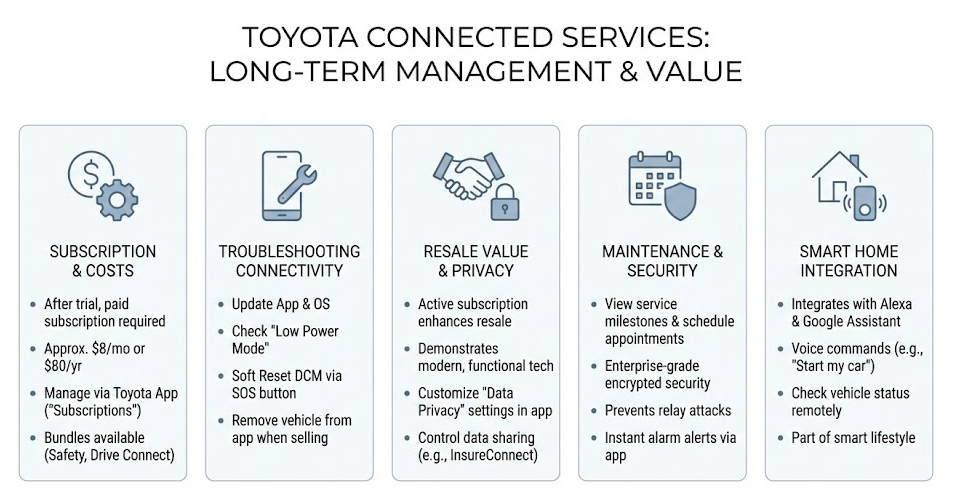
In addition to the remote features, the app serves as a centralized hub for your vehicle’s maintenance history and service needs. You can view upcoming service milestones based on your actual mileage and schedule appointments directly with Mark Jacobson Toyota through the app interface. This integration ensures that your car remains in peak mechanical condition while you enjoy the digital perks, creating a holistic ownership experience that covers both the software and hardware aspects of your Toyota.
The security infrastructure behind these services is enterprise-grade, utilizing encrypted communication protocols to ensure that every command sent from your phone is authenticated. This prevents “relay attacks” and other forms of modern vehicle theft that target keyless systems. By utilizing Remote Connect, you are actually adding a layer of digital security to your vehicle, as you can receive instant alerts if your car’s alarm is triggered, allowing for a much faster response than traditional sirens alone.
Finally, for residents of the Triangle who frequently travel, the app’s ability to integrate with smart home devices like Amazon Alexa or Google Assistant adds another layer of luxury. You can use voice commands from your living room to ask, “Alexa, ask Toyota to start my car,” or “Hey Google, how much gas is in my RAV4?” This level of integration ensures that your Toyota is not just a tool for transportation, but a fully integrated part of your smart lifestyle, saving you time and effort every single day.
Visit Mark Jacobson Toyota for Expert Technology Support
Technology can be tricky, but you don’t have to navigate it alone. If you are having trouble setting up your Remote Connect, need help with the Digital Key authorization, or simply want a hands-on demonstration of how these features can improve your daily commute, visit us for technology help at Mark Jacobson Toyota. Our dedicated “Technology Specialists” are trained to walk you through every click and tap, ensuring your phone and car are perfectly synced before you leave the lot. Whether you are looking to find vehicles with Remote Connect or need to troubleshoot an existing account, we are here to serve the Durham, Chapel Hill, and Raleigh communities. Stop by 14516 Durham-Chapel Hill Blvd in Durham, NC, and let’s get you connected today.
Connect with us


Recent Blog Entries
- 2026 Toyota Sienna AWD Guide for Durham Families
- Toyota Car Buying Checklist for Triangle College Graduates
- 2026 Toyota Camry Hybrid MPG and Commute Guide for RTP Drivers
- Toyota A/C Service & Repair Guide for Durham Summer Driving
- 2026 Toyota Prius vs Prius Plug-in Hybrid: Which Saves You More in Durham?